> ## Documentation Index
> Fetch the complete documentation index at: https://docs.getoutbox.ai/llms.txt
> Use this file to discover all available pages before exploring further.

# Tool Library

> Explore plug-and-play tools for your AI agents

## Overview

The Tool Library provides ready-made integrations that your AI agents can use during conversations. No coding required—just add the tool, configure the settings, and your agent can book appointments, send messages, fetch data, and more.

<Tip>
  **How it works:** When you add a tool to your agent, it becomes available for
  the agent to call during conversations. The agent decides when to use each
  tool based on your prompt instructions.
</Tip>

***

## Built-In Agent Tools

Built-in tools are Outbox-native actions you can attach to an agent without creating a custom webhook or MCP server.

### Available Built-In Tools

Use the API to fetch the current list:

```http theme={null}
GET /agent/tool/builtins/
```

Or fetch tools in the context of a specific agent:

```http theme={null}
GET /agent/tool/builtins/{agent_id}/
```

Response items include the tool key, display name, description, and resolved input schema:

```json theme={null}
{
  "key": "send_sms",
  "name": "Send SMS",
  "description": "Send an SMS to the current contact or custom phone numbers.",
  "schema": []
}
```

Current `builtin_key` values:

```json theme={null}
[
  "send_sms",
  "send_email",
  "create_opportunity",
  "update_opportunity",
  "update_contact",
  "add_tag",
  "remove_tag",
  "add_to_workflow",
  "remove_from_workflow",
  "book_ai_callback"
]
```

### Attach a Built-In Tool

Built-in tools are attached after the agent is created:

```http theme={null}
POST /agent/tool/{agent_id}/
```

```json theme={null}
{
  "type": "builtin",
  "builtin_key": "send_sms",
  "name": "send_sms",
  "description": "Send an SMS to the current contact.",
  "config": {},
  "is_success": false,
  "is_prerun": false,
  "is_postrun": false
}
```

<Note>
  `builtin_key` is the important field. Use `config` to pre-fill tool inputs so
  the agent does not need to supply them during the conversation.
</Note>

<Tip>
  Set `is_success: true` when a successful run of this tool should mark the
  conversation as successful. The backend returns the attached tool with
  `builtin_key`, `display_name`, and the resolved `schema`.
</Tip>

***

## Variables vs Configurations

Understanding the difference between variables and configurations is key to using tools effectively.

<CardGroup cols={2}>
  <Card title="Variables" icon="wand-sparkles">
    **Filled by the agent during the conversation** The agent gathers this
    information from the customer and passes it to the tool. **Examples:** -
    Customer's name - Preferred appointment time - Email address - Phone number
  </Card>

  <Card title="Configurations" icon="gear">
    **Preset when you add the tool** You configure these once, and they stay the
    same for every call/chat. **Examples:** - API keys - Calendar IDs - Default
    timezone - Integration credentials
  </Card>
</CardGroup>

**Example:**

When using the "Fetch Free Slots" tool:

* **Configuration:** You set the Calendar ID once (which calendar to check)
* **Variables:** The agent fills in the start\_date and timezone during each conversation

***

## Popular Tools

Commonly used tools that work across all industries.

***

<div
  style={{
display: "flex",
alignItems: "center",
gap: "10px",
}}
>
  <img src="https://mintcdn.com/outboxsolutions/plo-fWW7jo-p-6rX/images/gohighlevel.png?fit=max&auto=format&n=plo-fWW7jo-p-6rX&q=85&s=b0c833ff19bc293a55259738b9fefc50" alt="GoHighLevel" style={{ width: "32px", height: "32px", borderRadius: "6px" }} width="512" height="512" data-path="images/gohighlevel.png" />

  <h2 style={{ margin: 0 }}>GoHighLevel Integration</h2>
</div>

Tools for integrating with your GoHighLevel CRM and calendars.

***

<div
  style={{
display: "flex",
alignItems: "center",
gap: "10px",
}}
>
  <img src="https://mintcdn.com/outboxsolutions/plo-fWW7jo-p-6rX/images/cal-com.png?fit=max&auto=format&n=plo-fWW7jo-p-6rX&q=85&s=32f59291a212d70c55c2d55b993dc6e5" alt="Cal.com" style={{ width: "32px", height: "32px", borderRadius: "6px" }} width="500" height="500" data-path="images/cal-com.png" />

  <h2 style={{ margin: 0 }}>Cal.com Integration</h2>
</div>

Tools for managing appointments with Cal.com calendars.

***

<div
  style={{
display: "flex",
alignItems: "center",
gap: "10px",
}}
>
  <img src="https://mintcdn.com/outboxsolutions/plo-fWW7jo-p-6rX/images/cal-com.png?fit=max&auto=format&n=plo-fWW7jo-p-6rX&q=85&s=32f59291a212d70c55c2d55b993dc6e5" alt="Cal.com" style={{ width: "32px", height: "32px", borderRadius: "6px" }} width="500" height="500" data-path="images/cal-com.png" />

  <h2 style={{ margin: 0 }}>Cal.com (Legacy)</h2>
</div>

Legacy tools for managing appointments with Cal.com calendars.

***

# MCP Application Integrations

Connect to 60+ popular applications through MCP application integrations. These applications are available as preset MCP servers—simply authenticate and select which tools you want your agent to access.

<Tip>
  **How it works:** When you add an MCP application integration, you'll
  authenticate your account and then choose specific tools/actions from that
  application. Your agent can then perform those actions during conversations.
  See the [MCP Server section](/chat-agents#mcp-server) for detailed setup
  instructions.

</Tip>

<div
  style={{
display: "flex",
alignItems: "center",
gap: "10px",
}}
>
  <img src="https://django-outbox-public.s3.amazonaws.com/app_icons/app-acculynx.com" alt="AccuLynx" style={{ width: "32px", height: "32px", borderRadius: "6px" }} />

  <h2 style={{ margin: 0 }}>AccuLynx</h2>
</div>

Using the AccuLynx API, data can be seamlessly exchanged between AccuLynx and other applications for greater efficiency and productivity.

***

<div
  style={{
display: "flex",
alignItems: "center",
gap: "10px",
}}
>
  <img src="https://django-outbox-public.s3.amazonaws.com/app_icons/app-active_campaign.com" alt="ActiveCampaign" style={{ width: "32px", height: "32px", borderRadius: "6px" }} />

  <h2 style={{ margin: 0 }}>ActiveCampaign</h2>
</div>

ActiveCampaign is a marketing automation and CRM platform enabling businesses to manage email campaigns, sales pipelines, and customer segmentation to boost engagement and drive growth.

***

<div
  style={{
display: "flex",
alignItems: "center",
gap: "10px",
}}
>
  <img src="https://django-outbox-public.s3.amazonaws.com/app_icons/Screenshot_2025-10-24_at_3.39.44PM.png" alt="AgencyZoom" style={{ width: "32px", height: "32px", borderRadius: "6px" }} />

  <h2 style={{ margin: 0 }}>AgencyZoom</h2>
</div>

AgencyZoom is for the P\&C insurance agent that's looking to increase sales, boost retention and analyze agency & producer performance.

***

<div
  style={{
display: "flex",
alignItems: "center",
gap: "10px",
}}
>
  <img src="https://django-outbox-public.s3.amazonaws.com/app_icons/app-airtable.com" alt="Airtable" style={{ width: "32px", height: "32px", borderRadius: "6px" }} />

  <h2 style={{ margin: 0 }}>Airtable</h2>
</div>

Airtable merges spreadsheet functionality with database power, enabling teams to organize projects, track tasks, and collaborate through customizable views, automation, and integrations for data management.

***

<div
  style={{
display: "flex",
alignItems: "center",
gap: "10px",
}}
>
  <img src="https://django-outbox-public.s3.amazonaws.com/app_icons/icon.svg" alt="Apollo" style={{ width: "32px", height: "32px", borderRadius: "6px" }} />

  <h2 style={{ margin: 0 }}>Apollo</h2>
</div>

Apollo provides CRM and lead generation capabilities, helping businesses discover contacts, manage outreach, and track sales pipelines for consistent customer relationship development.

***

<div
  style={{
display: "flex",
alignItems: "center",
gap: "10px",
}}
>
  <img src="https://django-outbox-public.s3.amazonaws.com/app_icons/asana.svg" alt="Asana" style={{ width: "32px", height: "32px", borderRadius: "6px" }} />

  <h2 style={{ margin: 0 }}>Asana</h2>
</div>

Tool to help teams organize, track, and manage their work.

***

<div
  style={{
display: "flex",
alignItems: "center",
gap: "10px",
}}
>
  <img src="https://django-outbox-public.s3.amazonaws.com/app_icons/app-bamboohr.com" alt="BambooHR" style={{ width: "32px", height: "32px", borderRadius: "6px" }} />

  <h2 style={{ margin: 0 }}>BambooHR</h2>
</div>

BambooHR is an American technology company that provides human resources software as a service.

***

<div
  style={{
display: "flex",
alignItems: "center",
gap: "10px",
}}
>
  <img src="https://django-outbox-public.s3.amazonaws.com/app_icons/brevo.svg" alt="Brevo" style={{ width: "32px", height: "32px", borderRadius: "6px" }} />

  <h2 style={{ margin: 0 }}>Brevo</h2>
</div>

Brevo is an all-in-one marketing platform that helps businesses grow through email marketing, SMS, chat, and CRM tools.

***

<div
  style={{
display: "flex",
alignItems: "center",
gap: "10px",
}}
>
  <img src="https://django-outbox-public.s3.amazonaws.com/app_icons/app-bill.com" alt="BILL" style={{ width: "32px", height: "32px", borderRadius: "6px" }} />

  <h2 style={{ margin: 0 }}>BILL</h2>
</div>

BILL is a leading provider of cloud-based software that simplifies, digitizes, and automates back-office financial processes for small and mid-sized businesses. Our customers come from all industries, ranging from startups to established brands and nonprofits to franchises.

***

<div
  style={{
display: "flex",
alignItems: "center",
gap: "10px",
}}
>
  <img src="https://django-outbox-public.s3.amazonaws.com/app_icons/cal_vC2IAGj.com_N0Xu85Y.png" alt="Cal.com" style={{ width: "32px", height: "32px", borderRadius: "6px" }} />

  <h2 style={{ margin: 0 }}>Cal.com</h2>
</div>

Cal simplifies meeting coordination by providing shareable booking pages, calendar syncing, and availability management to streamline the scheduling process.

***

<div
  style={{
display: "flex",
alignItems: "center",
gap: "10px",
}}
>
  <img src="https://django-outbox-public.s3.amazonaws.com/app_icons/app-calendarhero.com" alt="CalendarHero" style={{ width: "32px", height: "32px", borderRadius: "6px" }} />

  <h2 style={{ margin: 0 }}>CalendarHero</h2>
</div>

CalendarHero is a versatile scheduling tool designed to streamline and simplify your calendar management. It integrates seamlessly with your existing calendars, allowing you to efficiently schedule, reschedule, and manage meetings with ease.

***

<div
  style={{
display: "flex",
alignItems: "center",
gap: "10px",
}}
>
  <img src="https://django-outbox-public.s3.amazonaws.com/app_icons/calendly.svg" alt="Calendly" style={{ width: "32px", height: "32px", borderRadius: "6px" }} />

  <h2 style={{ margin: 0 }}>Calendly</h2>
</div>

Calendly is an appointment scheduling tool that automates meeting invitations, availability checks, and reminders, helping individuals and teams avoid email back-and-forth.

***

<div
  style={{
display: "flex",
alignItems: "center",
gap: "10px",
}}
>
  <img src="https://django-outbox-public.s3.amazonaws.com/app_icons/clickup.svg" alt="ClickUp" style={{ width: "32px", height: "32px", borderRadius: "6px" }} />

  <h2 style={{ margin: 0 }}>ClickUp</h2>
</div>

ClickUp unifies tasks, docs, goals, and chat in a single platform, allowing teams to plan, organize, and collaborate across projects with customizable workflows.

***

<div
  style={{
display: "flex",
alignItems: "center",
gap: "10px",
}}
>
  <img src="https://django-outbox-public.s3.amazonaws.com/app_icons/app-close.com" alt="Close" style={{ width: "32px", height: "32px", borderRadius: "6px" }} />

  <h2 style={{ margin: 0 }}>Close</h2>
</div>

Close is a CRM platform designed to help businesses manage and streamline their sales processes, including calling, email automation, and predictive dialers.

***

<div
  style={{
display: "flex",
alignItems: "center",
gap: "10px",
}}
>
  <img src="https://django-outbox-public.s3.amazonaws.com/app_icons/Screenshot_2025-10-24_at_3.51.32PM.png" alt="Composio Search" style={{ width: "32px", height: "32px", borderRadius: "6px" }} />

  <h2 style={{ margin: 0 }}>Composio Search</h2>
</div>

Composio Search provides comprehensive web search across travel (flights, hotels, events), e-commerce (Amazon, Walmart, shopping), financial markets, news, academic research, images, and location services.

***

<div
  style={{
display: "flex",
alignItems: "center",
gap: "10px",
}}
>
  <img src="https://django-outbox-public.s3.amazonaws.com/app_icons/discordbot.svg" alt="Discord Bot" style={{ width: "32px", height: "32px", borderRadius: "6px" }} />

  <h2 style={{ margin: 0 }}>Discord Bot</h2>
</div>

Discordbot refers to automated programs on Discord servers, performing tasks like moderation, music playback, and user engagement to enhance community interactions.

***

<div
  style={{
display: "flex",
alignItems: "center",
gap: "10px",
}}
>
  <img src="https://django-outbox-public.s3.amazonaws.com/app_icons/app-dynamics365.com" alt="Dynamics 365" style={{ width: "32px", height: "32px", borderRadius: "6px" }} />

  <h2 style={{ margin: 0 }}>Dynamics 365</h2>
</div>

Dynamics 365 from Microsoft combines CRM, ERP, and productivity apps to streamline sales, marketing, customer service, and operations in one integrated platform.

***

<div
  style={{
display: "flex",
alignItems: "center",
gap: "10px",
}}
>
  <img src="https://django-outbox-public.s3.amazonaws.com/app_icons/app-freshdesk.com" alt="Freshdesk" style={{ width: "32px", height: "32px", borderRadius: "6px" }} />

  <h2 style={{ margin: 0 }}>Freshdesk</h2>
</div>

Freshdesk provides customer support software with ticketing, knowledge base, and automation features for efficient helpdesk operations and better customer experiences.

***

<div
  style={{
display: "flex",
alignItems: "center",
gap: "10px",
}}
>
  <img src="https://django-outbox-public.s3.amazonaws.com/app_icons/app-gmail_lvO35bh.com" alt="Gmail" style={{ width: "32px", height: "32px", borderRadius: "6px" }} />

  <h2 style={{ margin: 0 }}>Gmail</h2>
</div>

Gmail is Google's email service, featuring spam protection, search functions, and seamless integration with other G Suite apps for productivity.

***

<div
  style={{
display: "flex",
alignItems: "center",
gap: "10px",
}}
>
  <img src="https://django-outbox-public.s3.amazonaws.com/app_icons/googlecalendar_gX71Vlt.svg" alt="Google Calendar" style={{ width: "32px", height: "32px", borderRadius: "6px" }} />

  <h2 style={{ margin: 0 }}>Google Calendar</h2>
</div>

Google Calendar is a time management tool providing scheduling features, event reminders, and integration with email and other apps for streamlined organization.

***

<div
  style={{
display: "flex",
alignItems: "center",
gap: "10px",
}}
>
  <img src="https://django-outbox-public.s3.amazonaws.com/app_icons/google_maps.svg" alt="Google Maps" style={{ width: "32px", height: "32px", borderRadius: "6px" }} />

  <h2 style={{ margin: 0 }}>Google Maps</h2>
</div>

Integrate Google Maps to access location data, geocoding, directions, and mapping services in your application.

***

<div
  style={{
display: "flex",
alignItems: "center",
gap: "10px",
}}
>
  <img src="https://django-outbox-public.s3.amazonaws.com/app_icons/googlesheets.svg" alt="Google Sheets" style={{ width: "32px", height: "32px", borderRadius: "6px" }} />

  <h2 style={{ margin: 0 }}>Google Sheets</h2>
</div>

Google Sheets is a cloud-based spreadsheet tool enabling real-time collaboration, data analysis, and integration with other Google Workspace apps.

***

<div
  style={{
display: "flex",
alignItems: "center",
gap: "10px",
}}
>
  <img src="https://django-outbox-public.s3.amazonaws.com/app_icons/app-gorgias.com" alt="Gorgias" style={{ width: "32px", height: "32px", borderRadius: "6px" }} />

  <h2 style={{ margin: 0 }}>Gorgias</h2>
</div>

Gorgias is a helpdesk and live chat platform specializing in e-commerce, offering automated support, order management, and unified customer communication.

***

<div
  style={{
display: "flex",
alignItems: "center",
gap: "10px",
}}
>
  <img src="https://django-outbox-public.s3.amazonaws.com/app_icons/app-helpdesk.com" alt="HelpDesk" style={{ width: "32px", height: "32px", borderRadius: "6px" }} />

  <h2 style={{ margin: 0 }}>HelpDesk</h2>
</div>

HelpDesk is a ticketing system designed to streamline customer support by organizing and managing inquiries efficiently.

***

<div
  style={{
display: "flex",
alignItems: "center",
gap: "10px",
}}
>
  <img src="https://django-outbox-public.s3.amazonaws.com/app_icons/app-hubspot.com" alt="HubSpot" style={{ width: "32px", height: "32px", borderRadius: "6px" }} />

  <h2 style={{ margin: 0 }}>HubSpot</h2>
</div>

HubSpot is an inbound marketing, sales, and customer service platform integrating CRM, email automation, and analytics to facilitate lead nurturing and seamless customer experiences.

***

<div
  style={{
display: "flex",
alignItems: "center",
gap: "10px",
}}
>
  <img src="https://django-outbox-public.s3.amazonaws.com/app_icons/app-intercom.com" alt="Intercom" style={{ width: "32px", height: "32px", borderRadius: "6px" }} />

  <h2 style={{ margin: 0 }}>Intercom</h2>
</div>

Intercom provides live chat, messaging, and customer engagement tools, enabling businesses to drive conversions, handle support, and personalize communication at scale.

***

<div
  style={{
display: "flex",
alignItems: "center",
gap: "10px",
}}
>
  <img src="https://django-outbox-public.s3.amazonaws.com/app_icons/app-jira.com" alt="Jira" style={{ width: "32px", height: "32px", borderRadius: "6px" }} />

  <h2 style={{ margin: 0 }}>Jira</h2>
</div>

A tool for bug tracking, issue tracking, and agile project management.

***

<div
  style={{
display: "flex",
alignItems: "center",
gap: "10px",
}}
>
  <img src="https://django-outbox-public.s3.amazonaws.com/app_icons/klaviyo.svg" alt="Klaviyo" style={{ width: "32px", height: "32px", borderRadius: "6px" }} />

  <h2 style={{ margin: 0 }}>Klaviyo</h2>
</div>

Klaviyo is a data-driven email and SMS marketing platform that allows e-commerce brands to deliver targeted messages, track conversions, and scale customer relationships.

***

<div
  style={{
display: "flex",
alignItems: "center",
gap: "10px",
}}
>
  <img src="https://django-outbox-public.s3.amazonaws.com/app_icons/Screenshot_2025-10-24_at_3.51.37PM.png" alt="Linear" style={{ width: "32px", height: "32px", borderRadius: "6px" }} />

  <h2 style={{ margin: 0 }}>Linear</h2>
</div>

Linear is a streamlined issue tracking and project planning tool for modern teams, featuring fast workflows, keyboard shortcuts, and GitHub integrations.

***

<div
  style={{
display: "flex",
alignItems: "center",
gap: "10px",
}}
>
  <img src="https://django-outbox-public.s3.amazonaws.com/app_icons/app-mailchimp.com" alt="Mailchimp" style={{ width: "32px", height: "32px", borderRadius: "6px" }} />

  <h2 style={{ margin: 0 }}>Mailchimp</h2>
</div>

Mailchimp is an email marketing and automation platform providing campaign templates, audience segmentation, and performance analytics to drive engagement and conversions.

***

<div
  style={{
display: "flex",
alignItems: "center",
gap: "10px",
}}
>
  <img src="https://django-outbox-public.s3.amazonaws.com/app_icons/app-mailerlite.com" alt="MailerLite" style={{ width: "32px", height: "32px", borderRadius: "6px" }} />

  <h2 style={{ margin: 0 }}>MailerLite</h2>
</div>

MailerLite is an email marketing service that offers tools for creating and managing email campaigns, automating workflows, and building landing pages.

***

<div
  style={{
display: "flex",
alignItems: "center",
gap: "10px",
}}
>
  <img src="https://django-outbox-public.s3.amazonaws.com/app_icons/microsoft_teams.svg" alt="Microsoft Teams" style={{ width: "32px", height: "32px", borderRadius: "6px" }} />

  <h2 style={{ margin: 0 }}>Microsoft Teams</h2>
</div>

Microsoft Teams integrates chat, video meetings, and file storage within Microsoft 365, providing virtual collaboration and communication for distributed teams.

***

<div
  style={{
display: "flex",
alignItems: "center",
gap: "10px",
}}
>
  <img src="https://django-outbox-public.s3.amazonaws.com/app_icons/app-monday.com" alt="Monday.com" style={{ width: "32px", height: "32px", borderRadius: "6px" }} />

  <h2 style={{ margin: 0 }}>Monday.com</h2>
</div>

monday.com is a customizable work management platform for project planning, collaboration, and automation, supporting agile, sales, marketing, and more.

***

<div
  style={{
display: "flex",
alignItems: "center",
gap: "10px",
}}
>
  <img src="https://django-outbox-public.s3.amazonaws.com/app_icons/app-notion.com" alt="Notion" style={{ width: "32px", height: "32px", borderRadius: "6px" }} />

  <h2 style={{ margin: 0 }}>Notion</h2>
</div>

Notion centralizes notes, docs, wikis, and tasks in a unified workspace, letting teams build custom workflows for collaboration and knowledge management.

***

<div
  style={{
display: "flex",
alignItems: "center",
gap: "10px",
}}
>
  <img src="https://django-outbox-public.s3.amazonaws.com/app_icons/outlook.svg" alt="Outlook" style={{ width: "32px", height: "32px", borderRadius: "6px" }} />

  <h2 style={{ margin: 0 }}>Outlook</h2>
</div>

Outlook is Microsoft's email and calendaring platform integrating contacts, tasks, and scheduling, enabling users to manage communications and events in a unified workspace.

***

<div
  style={{
display: "flex",
alignItems: "center",
gap: "10px",
}}
>
  <img src="https://django-outbox-public.s3.amazonaws.com/app_icons/app-pagerduty.com" alt="PagerDuty" style={{ width: "32px", height: "32px", borderRadius: "6px" }} />

  <h2 style={{ margin: 0 }}>PagerDuty</h2>
</div>

Integrate PagerDuty to manage incidents, schedules, and alerts directly from your application.

***

<div
  style={{
display: "flex",
alignItems: "center",
gap: "10px",
}}
>
  <img src="https://django-outbox-public.s3.amazonaws.com/app_icons/pandadoc.svg" alt="PandaDoc" style={{ width: "32px", height: "32px", borderRadius: "6px" }} />

  <h2 style={{ margin: 0 }}>PandaDoc</h2>
</div>

PandaDoc offers document creation, e-signatures, and workflow automation, helping sales teams and businesses streamline proposals, contracts, and agreement processes.

***

<div
  style={{
display: "flex",
alignItems: "center",
gap: "10px",
}}
>
  <img src="https://django-outbox-public.s3.amazonaws.com/app_icons/perplexity.webp" alt="Perplexity AI" style={{ width: "32px", height: "32px", borderRadius: "6px" }} />

  <h2 style={{ margin: 0 }}>Perplexity AI</h2>
</div>

Perplexity AI provides conversational AI models for generating human-like text responses.

***

<div
  style={{
display: "flex",
alignItems: "center",
gap: "10px",
}}
>
  <img src="https://django-outbox-public.s3.amazonaws.com/app_icons/app-pipedrive.com" alt="Pipedrive" style={{ width: "32px", height: "32px", borderRadius: "6px" }} />

  <h2 style={{ margin: 0 }}>Pipedrive</h2>
</div>

Pipedrive is a sales management tool built around pipeline visualization, lead tracking, activity reminders, and automation to keep deals progressing.

***

<div
  style={{
display: "flex",
alignItems: "center",
gap: "10px",
}}
>
  <img src="https://django-outbox-public.s3.amazonaws.com/app_icons/app-resend.com" alt="Resend" style={{ width: "32px", height: "32px", borderRadius: "6px" }} />

  <h2 style={{ margin: 0 }}>Resend</h2>
</div>

The universal API for sending emails.

***

<div
  style={{
display: "flex",
alignItems: "center",
gap: "10px",
}}
>
  <img src="https://django-outbox-public.s3.amazonaws.com/app_icons/app-salesforce.com" alt="Salesforce" style={{ width: "32px", height: "32px", borderRadius: "6px" }} />

  <h2 style={{ margin: 0 }}>Salesforce</h2>
</div>

Salesforce is a leading CRM platform integrating sales, service, marketing, and analytics to build customer relationships and drive business growth.

***

<div
  style={{
display: "flex",
alignItems: "center",
gap: "10px",
}}
>
  <img src="https://django-outbox-public.s3.amazonaws.com/app_icons/servicenow.webp" alt="ServiceNow" style={{ width: "32px", height: "32px", borderRadius: "6px" }} />

  <h2 style={{ margin: 0 }}>ServiceNow</h2>
</div>

Servicenow provides IT Service Management Transform service management to boost productivity and maximize ROI.

**Available Tools:**

*Tools documentation will be added here.*

***

<div
  style={{
display: "flex",
alignItems: "center",
gap: "10px",
}}
>
  <img src="https://django-outbox-public.s3.amazonaws.com/app_icons/servicem8.svg" alt="ServiceM8" style={{ width: "32px", height: "32px", borderRadius: "6px" }} />

  <h2 style={{ margin: 0 }}>ServiceM8</h2>
</div>

ServiceM8 helps field service businesses schedule jobs, send quotes, and manage invoices, offering staff mobile apps and real-time job status tracking.

***

<div
  style={{
display: "flex",
alignItems: "center",
gap: "10px",
}}
>
  <img src="https://django-outbox-public.s3.amazonaws.com/app_icons/app-shopify.com" alt="Shopify" style={{ width: "32px", height: "32px", borderRadius: "6px" }} />

  <h2 style={{ margin: 0 }}>Shopify</h2>
</div>

Shopify is an e-commerce platform enabling merchants to create online stores, manage products, and process payments with themes, apps, and integrated marketing tools.

***

<div
  style={{
display: "flex",
alignItems: "center",
gap: "10px",
}}
>
  <img src="https://django-outbox-public.s3.amazonaws.com/app_icons/slack.svg" alt="Slack" style={{ width: "32px", height: "32px", borderRadius: "6px" }} />

  <h2 style={{ margin: 0 }}>Slack</h2>
</div>

Slack is a channel-based messaging platform. With Slack, people can work together more effectively, connect all their software tools and services, and find the information they need to do their best work — all within a secure, enterprise-grade environment.

***

<div
  style={{
display: "flex",
alignItems: "center",
gap: "10px",
}}
>
  <img src="https://django-outbox-public.s3.amazonaws.com/app_icons/app-squareup.com" alt="Square" style={{ width: "32px", height: "32px", borderRadius: "6px" }} />

  <h2 style={{ margin: 0 }}>Square</h2>
</div>

Square is a payments and point-of-sale platform that lets businesses accept payments, manage orders and customers, run loyalty programs, and handle invoicing and team payroll across in-person, online, and mobile channels.

***

<div
  style={{
display: "flex",
alignItems: "center",
gap: "10px",
}}
>
  <img src="https://django-outbox-public.s3.amazonaws.com/app_icons/app-stripe.com" alt="Stripe" style={{ width: "32px", height: "32px", borderRadius: "6px" }} />

  <h2 style={{ margin: 0 }}>Stripe</h2>
</div>

Stripe offers online payment infrastructure, fraud prevention, and APIs enabling businesses to accept and manage payments globally.

***

<div
  style={{
display: "flex",
alignItems: "center",
gap: "10px",
}}
>
  <img src="https://django-outbox-public.s3.amazonaws.com/app_icons/survey_monkey.svg" alt="SurveyMonkey" style={{ width: "32px", height: "32px", borderRadius: "6px" }} />

  <h2 style={{ margin: 0 }}>SurveyMonkey</h2>
</div>

SurveyMonkey is an online survey development platform that enables users to create, distribute, and analyze surveys for various purposes.

***

<div
  style={{
display: "flex",
alignItems: "center",
gap: "10px",
}}
>
  <img src="https://django-outbox-public.s3.amazonaws.com/app_icons/telegram-logo.svg" alt="Telegram" style={{ width: "32px", height: "32px", borderRadius: "6px" }} />

  <h2 style={{ margin: 0 }}>Telegram</h2>
</div>

Telegram is a cloud-based messaging app with a focus on security and speed. Build bots to send messages, manage chats, and interact with users.

***

<div
  style={{
display: "flex",
alignItems: "center",
gap: "10px",
}}
>
  <img src="https://django-outbox-public.s3.amazonaws.com/app_icons/app-trello.com" alt="Trello" style={{ width: "32px", height: "32px", borderRadius: "6px" }} />

  <h2 style={{ margin: 0 }}>Trello</h2>
</div>

A web-based, kanban-style, list-making application.

***

<div
  style={{
display: "flex",
alignItems: "center",
gap: "10px",
}}
>
  <img src="https://django-outbox-public.s3.amazonaws.com/app_icons/app-whatsapp.com" alt="WhatsApp" style={{ width: "32px", height: "32px", borderRadius: "6px" }} />

  <h2 style={{ margin: 0 }}>WhatsApp</h2>
</div>

Enables interaction with customers through the WhatsApp Business API for messaging and automation. Only supports WhatsApp Business accounts, not WhatsApp Personal accounts.

***

<div
  style={{
display: "flex",
alignItems: "center",
gap: "10px",
}}
>
  <img src="https://django-outbox-public.s3.amazonaws.com/app_icons/app-xero.com" alt="Xero" style={{ width: "32px", height: "32px", borderRadius: "6px" }} />

  <h2 style={{ margin: 0 }}>Xero</h2>
</div>

Xero is a cloud-based accounting software for small businesses, providing invoicing, bank reconciliation, bookkeeping, and financial reporting in real time.

***

<div
  style={{
display: "flex",
alignItems: "center",
gap: "10px",
}}
>
  <img src="https://django-outbox-public.s3.amazonaws.com/app_icons/app-zendesk.com" alt="Zendesk" style={{ width: "32px", height: "32px", borderRadius: "6px" }} />

  <h2 style={{ margin: 0 }}>Zendesk</h2>
</div>

Zendesk provides customer support software with ticketing, live chat, and knowledge base features, enabling efficient helpdesk operations and customer engagement.

***

<div
  style={{
display: "flex",
alignItems: "center",
gap: "10px",
}}
>
  <img src="https://django-outbox-public.s3.amazonaws.com/app_icons/app-zoho.com" alt="Zoho" style={{ width: "32px", height: "32px", borderRadius: "6px" }} />

  <h2 style={{ margin: 0 }}>Zoho</h2>
</div>

Zoho is a suite of cloud applications including CRM, email marketing, and collaboration tools, enabling businesses to automate and scale operations.

***

<div
  style={{
display: "flex",
alignItems: "center",
gap: "10px",
}}
>
  <img src="https://django-outbox-public.s3.amazonaws.com/app_icons/zoho.webp" alt="Zoho Bigin" style={{ width: "32px", height: "32px", borderRadius: "6px" }} />

  <h2 style={{ margin: 0 }}>Zoho Bigin</h2>
</div>

Zoho Bigin is a simplified CRM solution from Zoho tailored for small businesses, focusing on pipeline tracking and relationship management.

***

<div
  style={{
display: "flex",
alignItems: "center",
gap: "10px",
}}
>
  <img src="https://django-outbox-public.s3.amazonaws.com/app_icons/zoom.svg" alt="Zoom" style={{ width: "32px", height: "32px", borderRadius: "6px" }} />

  <h2 style={{ margin: 0 }}>Zoom</h2>
</div>

Zoom is a video conferencing and online meeting platform featuring breakout rooms, screen sharing, and integrations with various enterprise tools.

<Note>
  **Authentication Required:** Most applications require OAuth2 or API key
  authentication. When you add an application integration, you'll be guided
  through the authentication process. Some applications may already be
  authenticated if you've connected them previously.
</Note>

<Tip>
  **Granular Tool Selection:** After authenticating an application, you can
  choose which specific tools/actions your agent can access. For example, with
  Gmail, you might only allow creating draft emails but not sending or reading
  emails. This gives you fine-grained control over what your agent can do.
</Tip>

***

## How to Add Tools to Your Agent

<Steps>
  <Step title="Open Your Agent">
    Navigate to the **Agents** tab and select the agent you want to enhance
  </Step>

  <Step title="Go to Tools Section">
    Scroll to the **Tools** section in the agent editor
  </Step>

  <Step title="Click Add Tool">
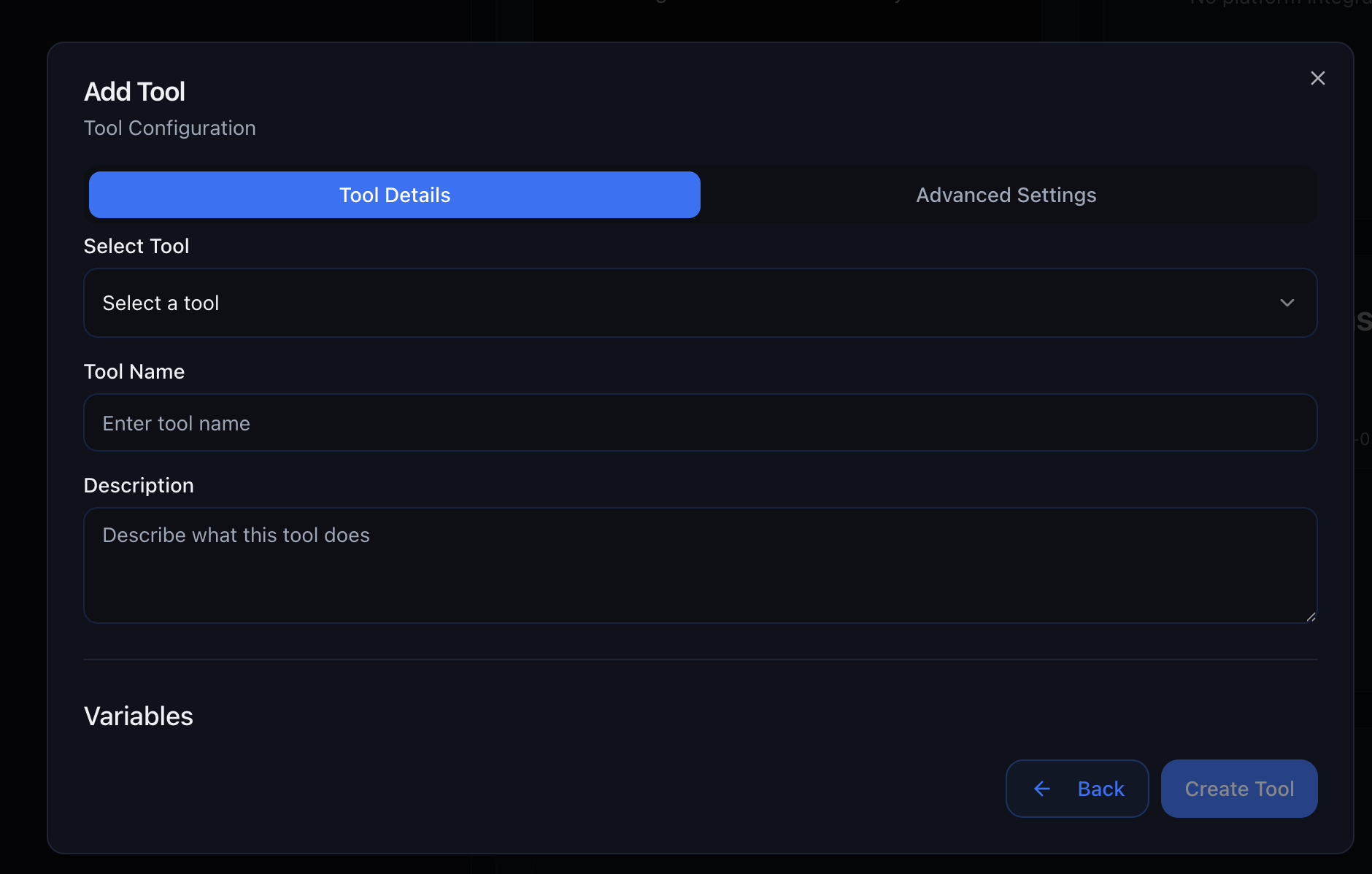
    Click **Add Tool** and choose **Tool Library**
  </Step>

  <Step title="Select a Tool">
    Browse by category or search for a specific tool by name
  </Step>

  <Step title="Configure Settings">
    Fill in any required **Configurations** (API keys, calendar IDs, etc.) These
    are one-time settings that apply to all uses of this tool
  </Step>

  <Step title="Update Your Prompt">
    Add instructions to your prompt telling the agent when to use this tool
    Example: "When a customer wants to book an appointment, use the Fetch Free
    Slots tool to show available times, then use Book Appointment to complete
    the booking."
  </Step>

  <Step title="Save and Test">
    Save your agent and test the tool integration thoroughly
  </Step>
</Steps>

<Frame>
  <img src="https://mintcdn.com/outboxsolutions/jQ0LoSOOg35Qyr-K/images/chat-tool-library.png?fit=max&auto=format&n=jQ0LoSOOg35Qyr-K&q=85&s=6be0535505fcd675e9b56ec042739814" alt="Add Tool from Library" width="1880" height="1198" data-path="images/chat-tool-library.png" />
</Frame>

***

## Best Practices

***

## Troubleshooting

***

## Request New Tools

Don't see the integration you need?

<Card title="Request a New Tool" icon="plus" href="mailto:support@getoutbox.ai?subject=Tool Library Request">
  Email us at [support@getoutbox.ai](mailto:support@getoutbox.ai) with: - The integration name (e.g., "Acuity
  Scheduling") - What you need it to do - Links to the API documentation - How
  many clients would use it Popular requests get prioritized!
</Card>

***

## Next Steps

<CardGroup cols={2}>
  <Card title="Chat Agents" icon="comments" href="/chat-agents">
    Add tools to your chat agents
  </Card>

  <Card title="Voice Agents" icon="phone" href="/voice-agents">
    Add tools to your voice agents
  </Card>

  <Card title="GoHighLevel Integration" icon="layer-group" href="/gohighlevel">
    Connect GoHighLevel to unlock GHL tools
  </Card>

  <Card title="Prompting Guide" icon="wand-magic-sparkles" href="/prompting-guide">
    Write prompts that use tools effectively
  </Card>
</CardGroup>
