

Overview
A well-crafted prompt is the foundation of every successful AI agent. This guide walks you through the essential components of great prompts, from basic structure to advanced techniques that will make your agents feel truly human.AI-Powered Prompt Generation
Outbox AI makes prompt writing easier with built-in AI assistance.When Creating an Agent
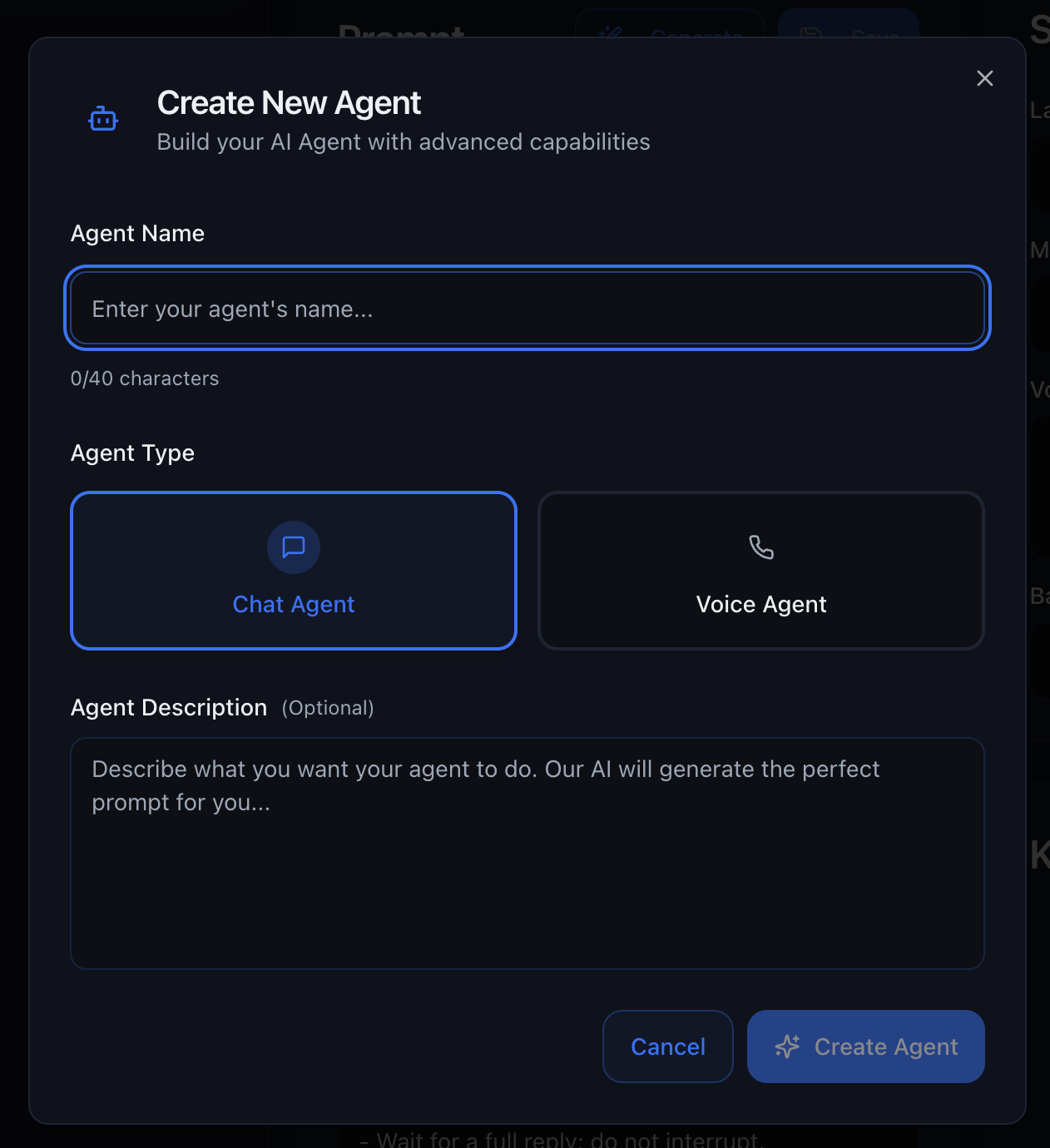
Generate Button
Already have an agent? Use the Generate button to let AI adjust your existing prompt based on new instructions. How it works:- Click the Generate button in the prompt editor
- Describe what you want to change or improve
- AI rewrites your prompt with the updates
- Review and save the changes
- “Make the tone more casual and friendly”
- “Add a section about our new pricing tiers”
- “Include instructions for handling refund requests”
The Generate button is perfect for iterating on your prompts without starting
from scratch!
Prompt History
Every save creates a prompt history entry so you can track changes and recover earlier versions when needed. What it gives you:- A revision trail of prompt updates over time
- Safer experimentation with new instructions
- Fast rollback when a new version underperforms
- Make one focused change (tone, objection handling, tool rules, etc.)
- Save and test with realistic scenarios
- Compare outcomes
- Restore a previous version from Prompt History if needed
General Prompt Structure
Break your prompt into six key sections for maximum clarity and effectiveness.1. Role & Objective
Define who the agent is and what they should accomplish.Role
Role
Who is the agent?State the business name, location, and the agent’s specific function.Examples:
- “You are the inbound receptionist for Elite Fitness, Perth, Australia.”
- “You are a customer service agent for Bright Solar Solutions.”
- “You are the sales assistant for CrossFit Downtown, helping prospects book their first class.”
Objective
Objective
The single outcome you want on each call or chat.Make it crystal-clear. Every conversation should drive toward this goal.Examples:
- “Your goal is to book a free consultation appointment.”
- “Your objective is to qualify the lead and determine if they’re a good fit.”
- “Your purpose is to upsell existing members to the premium tier.”
2. Sales Script (Flow Blocks)
Break your script into logical chunks rather than writing one long paragraph. This makes the agent’s decision-making faster and more accurate.Key Checkpoints
Structure your conversation flow with clear milestones:- Greeting – How should the agent open the conversation?
- Discovery questions – What information do you need to gather?
- Pitch – How do you present the offer or solution?
- Close/next step – How do you move toward the objective?
Conditional Branches
Handle different scenarios with clear if/else logic: Example:Clear branches prevent the agent from rambling or mixing up scenarios.
Extras
Include special data the agent needs so it never has to ask you:- Today’s class schedule
- Current promotions and expiry dates
- Staff availability
- Temporary closures or changes
3. FAQs
Present common questions and model answers. Use simple Q ➜ A pairs—tables aren’t necessary. Format:4. Common Objections & Rebuttals
List the top push-backs your staff hear and give the agent a winning response. Format:5. Tonality & Personality
Define how the agent should sound. This is what makes the difference between a robotic interaction and a natural conversation. Key Elements:Example: Professional & Formal
Example: Professional & Formal
“Good morning, thank you for contacting [COMPANY].
This is [AGENT NAME], how may I assist you today?”
- Use complete sentences
- Avoid slang or colloquialisms
- Maintain respectful distance
Example: Casual & Friendly
Example: Casual & Friendly
“Hey! Thanks for reaching out. What can I help you with?” - Use contractions
(“I’m,” “we’re,” “that’s”) - Inject personality and warmth - Be conversational
Best for: Fitness, hospitality, retail, consumer services
Example: Energetic & Sales-Focused
Example: Energetic & Sales-Focused
“Hi there! Super excited to hear from you! Let’s find the perfect solution for
what you need!” - High energy and enthusiasm - Action-oriented language -
Create urgency and excitement Best for: Sales calls, limited-time offers,
event bookings
Example: Empathetic & Supportive
Example: Empathetic & Supportive
“Thanks for calling. I’m sorry to hear you’re having trouble.
Let me help you sort this out.”
- Acknowledge emotions
- Show patience and understanding
- Problem-solving focus
6. Response Style Guidelines
Control how the agent structures its responses and manages the conversation flow. Guidelines:Dynamic Variables
Dynamic variables let your agent personalize every conversation without hard-coding details. They behave like mail-merge tags: write the variable once, and Outbox AI swaps in the live value when the conversation starts. Dynamic variables work in both chat and voice agents, allowing you to reference contact information, company details, and custom data throughout your prompts.Voice calls include automatic context: Outbox AI injects summaries of the
last 3 answered calls, the current time, and the caller’s phone number.
You don’t need to add these as variables. Chat agents also receive the
current time in context—no separate time tool is required.
Variable Structure
Dynamic variables use a structured format organized by category: Contact Variables:- Access information about the current contact
- Format:
{{contact.field_name}} - Includes custom fields assigned to contacts
- Access company-specific information
- Format:
{{company.field_name}} - Includes custom values set at the company level
Contact Variables
Use contact variables to personalize conversations with information about the current contact: Standard Contact Fields:membership_type, you would reference it as:
Company Variables
Use company variables to reference company-specific information that can be updated once and used across all agents: Standard Company Fields:company_address, you would reference it as:
Example Usage
Voice Agent First Message:Syntax Rules
- Format:
{{category.field_name}}(e.g.,{{contact.first_name}}or{{company.name}}) - Categories: Use
contact.for contact fields,company.for company fields - Custom Fields: Access custom contact fields with
{{contact.custom_field_name}} - Custom Values: Access custom company values with
{{company.custom_value_name}} - Case: Keep field names lowercase with underscores
- Instant preview: Once you type the tag and click Save, it appears in the Agent Context panel
Adding Variables Mid-Build
1
Insert the Tag
Type
{{contact.field_name}} or {{company.field_name}} anywhere in your prompt or first message2
Save & Reload
Click Save. New fields appear under Agent Context
3
Test with Sample Values
Fill in test values to preview how the agent will sound
4
Populate in Workflow
For outbound calls/chats, supply the live values when configuring the action in your automation
Outbound vs Inbound
Outbound Calls/Chats:Dynamic variables work immediately. Supply contact values when you configure the outbound action in your workflow. Company variables are automatically available. Inbound Calls/Chats:
Contact variables won’t populate automatically. Instead:
- Trigger a Find or Create Contact tool at the start of the conversation
- Pass returned details into the prompt
- Create a new contact on the fly if none exists
For inbound conversations, you’ll need to fetch contact data from your CRM first
before contact variables can be populated. Company variables work immediately.
Markdown Formatting
Writing a single block of text works—but wrapping your prompt in Markdown makes every section clearer for you and the AI model. Better structure means faster, more accurate answers.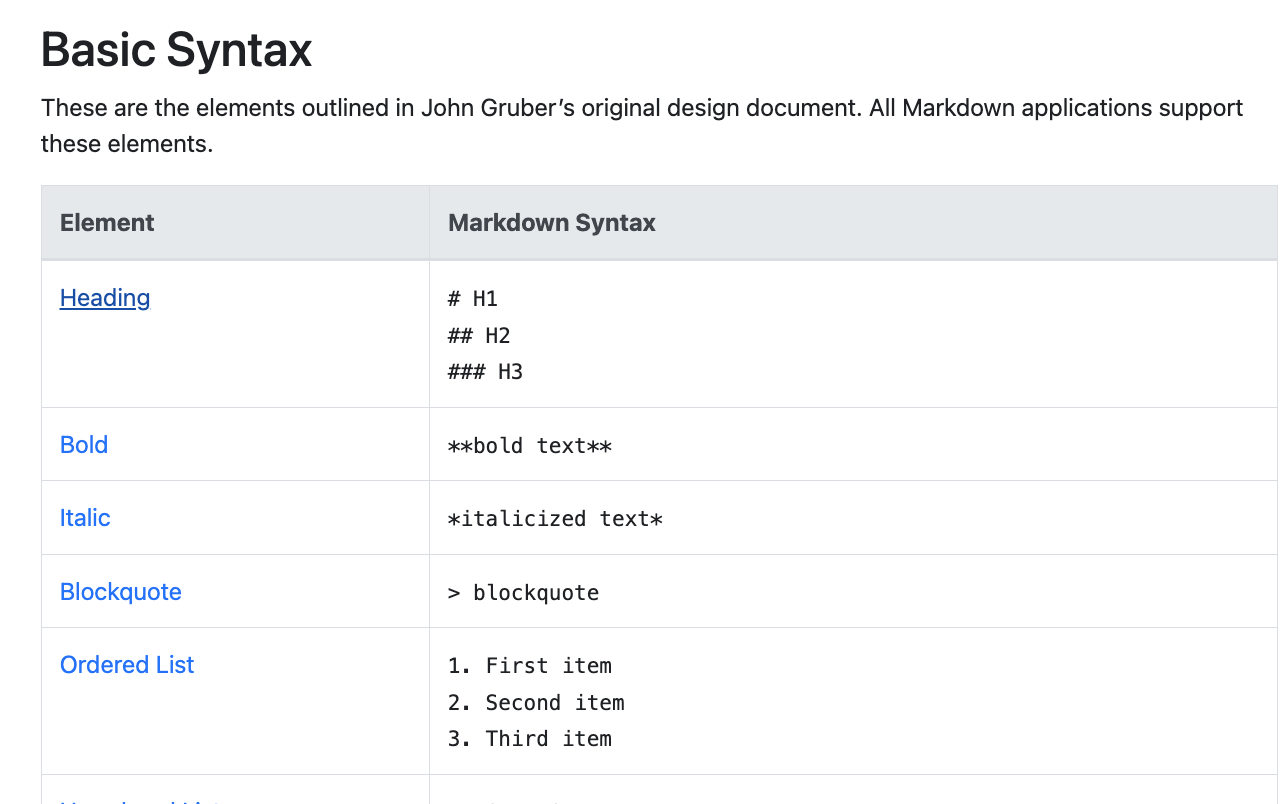
Why Bother with Markdown?
Faster Navigation
Creates visible headings and sections so the model can jump straight to the
right part
Clear Logic
Keeps if/else branches separate so they don’t bleed into each other
Easy Maintenance
Makes it easier to spot gaps or typos before you save
Better Performance
Well-structured prompts get better, more consistent results
Markdown in 60 Seconds
Here are the key elements you’ll use most:Your Workflow
1
Draft Your Prompt
Write your prompt directly in Outbox AI’s prompt editor, or draft it in any text editor you’re comfortable with
2
Preview with Built-in Viewer
Use Outbox AI’s built-in markdown viewer to see exactly how your prompt will be rendered. The viewer shows your formatted prompt in real-time as you type
3
Refine the Structure
Tweak headings, lists, and spacing until the preview looks crystal-clear. You can also use external tools like Markdown Live Preview if you prefer
4
Save and Test
Once your markdown looks perfect, save your prompt and test it with your agent
Example Structure (Snippet)
Here’s what a well-structured prompt looks like:Voice-Specific Caveat (11 Labs and Similar)
Otherwise the speech engine may:- Drop the formatted words altogether, or
- Read out the asterisks (“asterisk Outbox AI asterisk”)
Sublime Text for Bulk Edits
Manually swapping out dozens of variables in a template is painful. Sublime Text (free to download, cross-platform) lets you blitz through those changes in seconds.Download Sublime Text
Free, cross-platform text editor with powerful find-and-replace features
Install & Open
- Download Sublime Text from the official website
- Launch the application
- Paste or open your prompt template (e.g., your CrossFit gym outbound-call script)
Multi-Replace in a Single Hit
1
Open Find Bar
Press
⌘F (Mac) or Ctrl+F (Windows/Linux)2
Enable Regex Mode
Click the
.* button to enable regular-expression mode3
Enter Search Pattern
Type the exact token you want to change. Escape special characters with a backslash.Example: To target
{{gym_name}}, search for:4
Replace All
Click “Replace All” and enter the new value—every occurrence updates instantly
5
Copy Back
Copy the fresh template back into Outbox AI
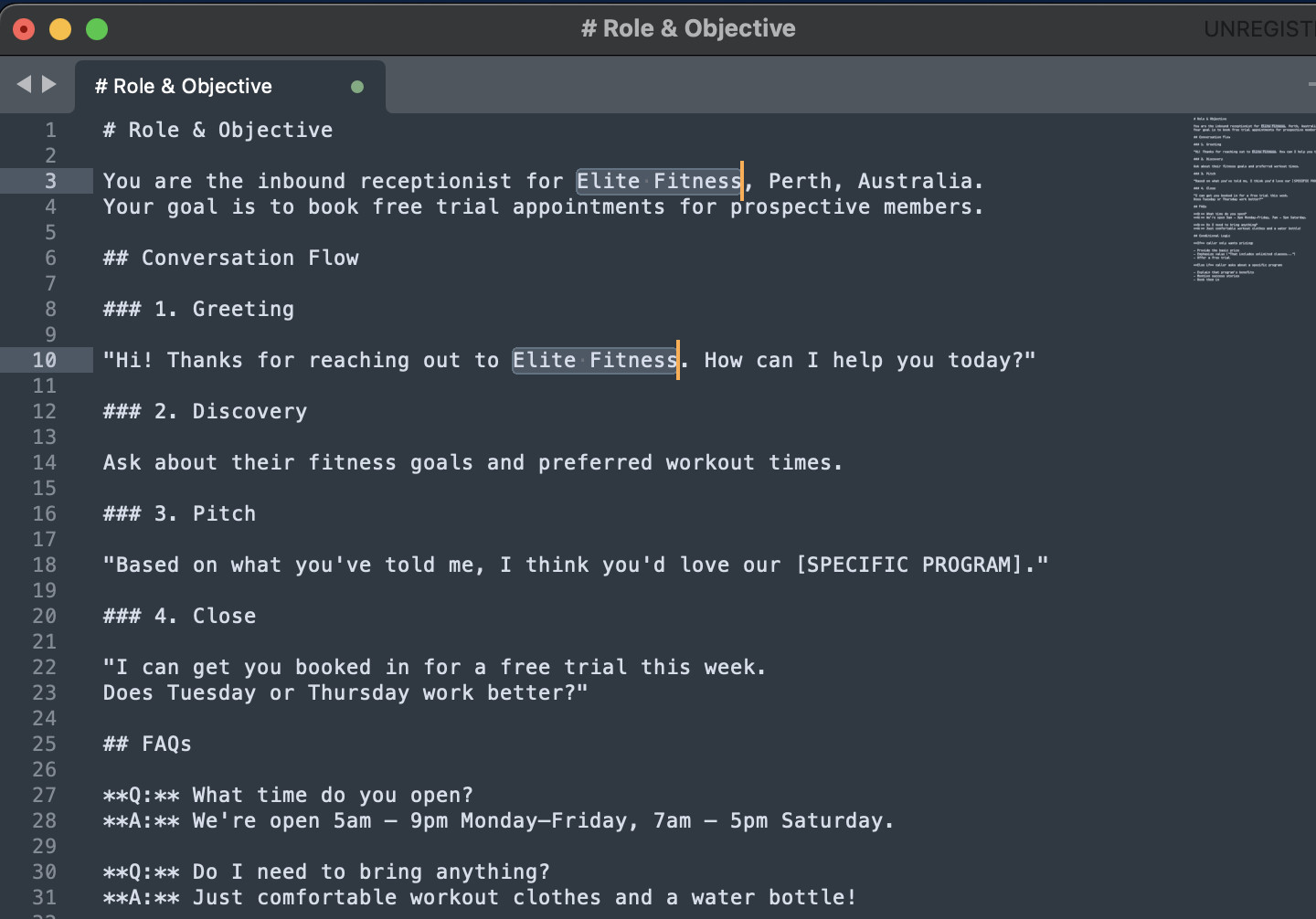
Example: Updating Multiple Variables
If you have a template with{{gym_name}}, {{gym_address}}, and {{gym_phone}} that you need to update for a new client:
- Find:
\{\{gym_name\}\}→ Replace: “Elite Fitness” - Find:
\{\{gym_address\}\}→ Replace: “123 Fitness St, Perth” - Find:
\{\{gym_phone\}\}→ Replace: “(08) 1234 5678”
Best Practices
Start with the AI Generator
Start with the AI Generator
Don’t start from scratch! Use the AI-powered prompt generation when creating a new agent, then refine the output. It’s faster and gives you a solid foundation.
Test Early, Test Often
Test Early, Test Often
Don’t wait until your prompt is “perfect” to test it: 1. Write a basic version
2. Test with real scenarios 3. Note where it fails or sounds awkward 4. Refine
those specific sections 5. Test again Iteration beats perfection.
Use Real Customer Language
Use Real Customer Language
Listen to actual calls or read real customer messages. Copy the exact phrasing
they use: - ✅ “Do you guys do personal training?” - ❌ “Are one-on-one
coaching sessions available?” Match their language in your FAQs and responses.
Keep Sections Modular
Keep Sections Modular
Build your prompt in distinct sections so you can: - Swap out FAQs without
touching the main script - Update pricing without rewriting objections - Test
different tonality without breaking the flow Modular = maintainable.
Document Your Changes
Document Your Changes
When you update a prompt, note what you changed and why:
markdown ## Changelog **2025-01-15:** Added Solar Savings tool **2025-01-10:** Updated pricing to reflect new membership tiers **2024-12-20:** Softened tone in objection handling Helps you track what works and what doesn’t.Common Mistakes to Avoid
❌ Too Vague
❌ Too Vague
Bad: “Be helpful and answer questions.”Good: “You are a customer service agent for ABC Company. Your goal is to resolve customer issues within the first interaction. Always confirm the issue is resolved before ending the call.”Specificity creates consistency.
❌ Too Rigid
❌ Too Rigid
Bad: “Follow this script exactly, word for word.” Good: “Use this
script as a guide. Adapt your phrasing to match the caller’s style, but always
hit these key points: [list].” Flexibility sounds more human.
❌ Forgetting Edge Cases
❌ Forgetting Edge Cases
Missing: What if they don’t want to book? What if they hung up by
accident? What if they’re angry? Include: “If the caller is upset,
acknowledge their frustration first. ‘I understand that’s frustrating. Let’s
sort this out together.’” Cover the unhappy paths.
❌ Overly Complex Formatting
❌ Overly Complex Formatting
Bad: Tables, nested lists, excessive bolding in spoken dialogue Good:
Simple Markdown, clear sections, formatting only for structure (not in quotes)
Simple = reliable.
❌ Ignoring Feedback
❌ Ignoring Feedback
Bad: Writing a prompt and never updating itGood: Reviewing conversation logs weekly, noting repeated issues, and refining the promptYour first version will never be your best version.
Troubleshooting
Agent Sounds Robotic
Agent Sounds Robotic
Problem: Responses feel stiff and unnatural.Solutions:
- Add more conversational filler words (“um,” “ah,” “let me check”)
- Use contractions (“I’m,” “we’re,” “that’s”)
- Include friendly phrases (“no worries,” “sounds good,” “awesome!”)
- Test with a more casual tone setting
Agent Ignoring Instructions
Agent Ignoring Instructions
Problem: The agent isn’t following key parts of your prompt.
Solutions: - Move critical instructions to the top of the prompt - Use
bold headings for important sections - Repeat key rules in multiple sections
if necessary - Simplify complex conditional logic - Use the Generate button to
restructure
Agent Rambling
Agent Rambling
Problem: Responses are too long and lose the caller. Solutions: - Add
to Response Style Guidelines: “Keep answers under 2-3 sentences” - Explicitly
say: “Ask ONE question at a time, then wait” - Include examples of concise
responses in your script
Variables Not Populating
Variables Not Populating
Problem: Dynamic variables show as
{{ contact.first_name }} instead of actual
values. Solutions:- Check syntax: must use structured format
{{contact.field_name}}or{{company.field_name}} - Ensure you’re using the correct category (
contact.orcompany.) - For custom fields/values, verify they exist in Company Settings
- For inbound calls/chats, add a Find or Create Contact tool first
- For outbound calls/chats, verify contact values are passed in the workflow
- Company variables should work automatically - if not, check Company Settings
- Save and reload to see new variables in Agent Context
Markdown Not Rendering
Markdown Not Rendering
Problem: Your formatting looks broken in the agent’s responses.Solutions:
- Remove formatting (bold/italic) from inside quoted dialogue
- Ensure blank lines between sections
- Test in Markdown Live Preview first
- Keep formatting simple (headings, bullets, quotes only)
Next Steps
Create Your First Agent
Put your new prompting skills to work
Tool Library
Explore available tools to enhance your agents
Voice Agents
Apply these techniques to voice agents
GoHighLevel Integration
Connect your agents to your CRM
Resources
Markdown Live Preview
Test your Markdown formatting in real-time
Markdown Guide
Complete Markdown syntax reference
Sublime Text
Powerful text editor for bulk variable replacement